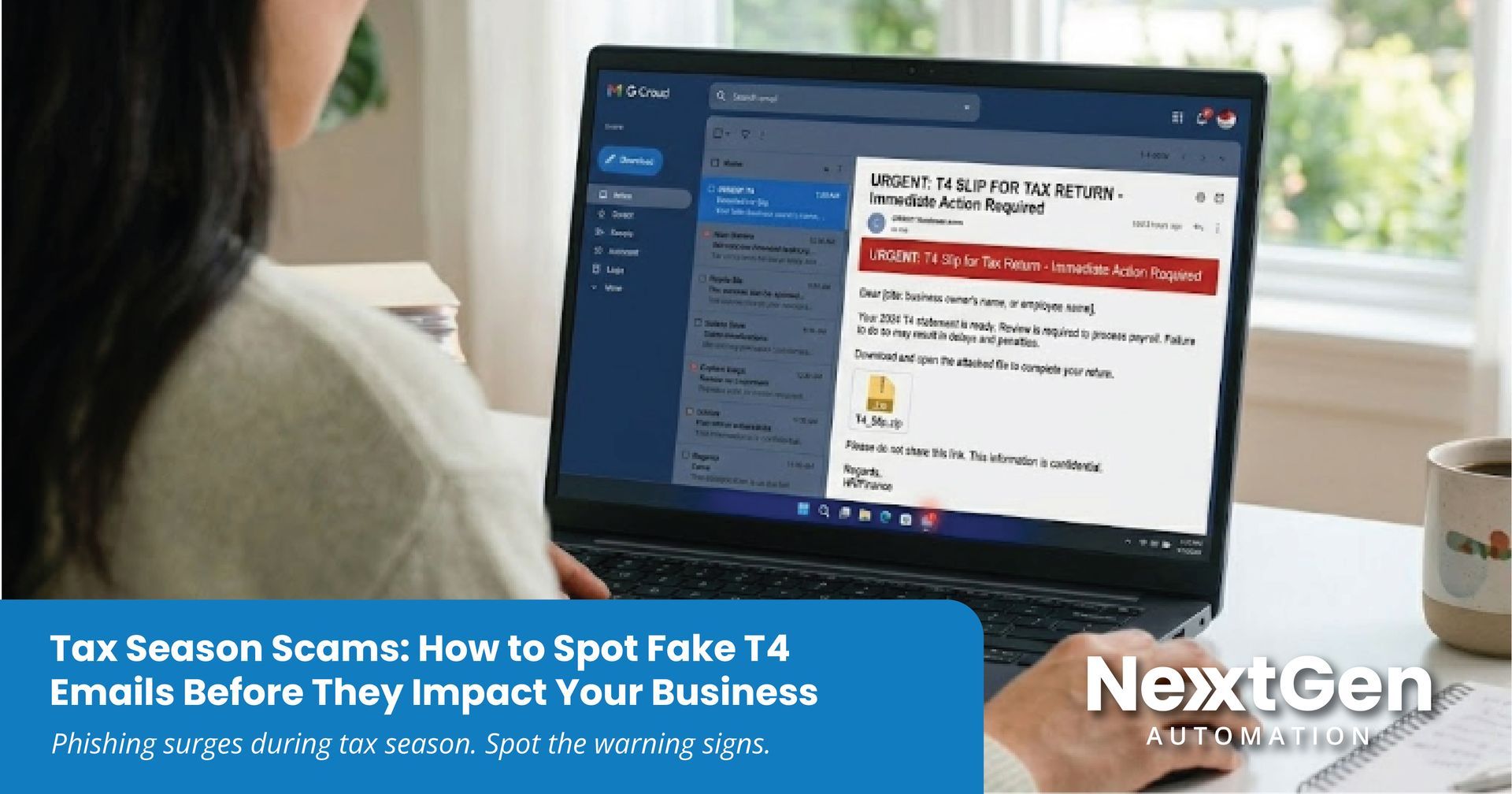
Tax Season Scams: How to Spot Fake T4 Emails Before They Impact Your Business
Tax season is busy for every organization. Payroll teams, finance departments, and business owners are processing documents quickly and responding to requests from accountants and employees.
Unfortunately, cybercriminals know this.
Every year during tax season, businesses see an increase in phishing emails disguised as tax documents such as T4 slips, payroll updates, or messages that appear to come from accountants, payroll providers, or government agencies.
These messages are designed to look legitimate. The goal is simple: convince someone in your organization to open an attachment, click a link, or enter login credentials.
Once that happens, attackers may gain access to company email accounts, financial systems, or sensitive employee information.
A single compromised account can quickly become a larger operational issue.
Why Tax Season Is a Target for Cybercriminals
Cyberattacks often succeed when people are busy and working quickly. Tax season creates exactly that environment.
Organizations are exchanging financial documents, reviewing payroll records, and responding to time-sensitive requests. When an email arrives that appears to contain a tax form or payroll update, it can feel routine.
Attackers take advantage of that routine.
These emails often mimic legitimate communications from:
• Payroll providers
• Accounting firms
• Internal HR or finance teams
• Government agencies
The message typically includes an attachment labeled as a T4 slip, payroll document, or tax statement, encouraging the recipient to review it immediately.
If opened, the file may install malware, redirect the user to a fake login page, or capture credentials used to access company systems.
Common Warning Signs of a Fake Tax Document
Phishing emails are becoming more convincing, but there are still clear indicators that something is not right.
Some of the most common warning signs include:
- Unexpected tax documents
Receiving a T4 or payroll file that you were not expecting should always be verified first. - Unfamiliar sender addresses
The name in the email may appear legitimate, but the domain may contain small spelling differences. - Urgent language
Messages that create pressure to act quickly are often designed to bypass normal verification steps. - Attachments you did not request
Unexpected PDF, Excel, or ZIP files should always be treated with caution. - Login pages accessed through email links
Before entering credentials, confirm that the website address is legitimate. Taking a moment to verify a message can prevent a much larger issue. - Practical Steps to Reduce Risk
Cybersecurity is most effective when it combines good technology with good habits. A few practical steps can significantly reduce the risk of phishing attacks. - Train employees to recognize suspicious emails
Awareness is one of the most effective defenses against phishing. - Strengthen email security
Advanced email protection tools can block many malicious attachments and phishing attempts before they reach inboxes. - Use
multi factor authentication
Even if a password is compromised, MFA can prevent unauthorized access. - Keep systems and security tools updated
Regular updates help close vulnerabilities attackers may attempt to exploit. - Verify sensitive requests through trusted channels
When an email involves payroll documents, financial information, or login credentials, confirm it directly before responding.
These small practices can make a significant difference in preventing incidents.
What to Do If Someone Clicks a Suspicious Email
Even well-prepared organizations occasionally experience incidents. The key is responding quickly.
If a user opens a malicious attachment or enters credentials into a fraudulent website, immediate action can help limit the impact.
Steps may include:
- Disconnecting affected devices from the network
- Resetting compromised passwords
- Running security scans
- Reviewing account activity for unusual behavior
- Investigating potential access to systems or financial data
Early detection and response can prevent a small mistake from becoming a larger disruption.
How NextGen Automation Helps Businesses Stay Protected
At NextGen Automation, we work with businesses that want their technology environment to be secure, reliable, and easier to manage.
Cyber threats like phishing emails are constantly evolving, especially during busy periods like tax season. That is why protection needs to be proactive and supported by the right expertise.
Our team helps organizations strengthen their technology environment through:
- Managed IT Services with proactive monitoring
- Advanced cybersecurity protection and threat detection
- Secure identity and access management
- Backup and disaster recovery solutions
- Security awareness support for employees
- Incident response when issues arise
We believe technology should support your operations, not introduce new risk or complexity.
Stay Ahead of Tax Season Cyber Threats
Tax season phishing scams are becoming more common across Canada. Fraudulent emails containing fake T4 slips, payroll updates, or tax documents are often used to trick employees into opening malicious files or entering login credentials.
At NextGen Automation, we help businesses across Kelowna, Vancouver, Kamloops, Vancouver Island, Alberta, and across Western Canada strengthen their cybersecurity posture and protect the systems they rely on every day.
Our team provides practical solutions including managed IT services, cybersecurity protection, secure email systems, backup and disaster recovery, and employee security awareness support to help reduce risk and keep operations running smoothly.
If you want to review your current technology environment or strengthen your protection against phishing attacks and other cyber threats, our team is here to help.
Book a cybersecurity consultation with NextGen Automation and see how a proactive technology strategy can help protect your business.
Industry News